Wildcard subdomain allows you to point all non-existing subdomains to a specific folder in your account. It means that if you enter different subdomains (which are not created in your cPanel) in your browser, they all will show the same content that you uploaded to the folder set for the wildcard subdomain.
In order to create a wildcard subdomain, follow the next steps:
1. Log into your cPanel.
2. Navigate to the menu Subdomains under the Domains section: 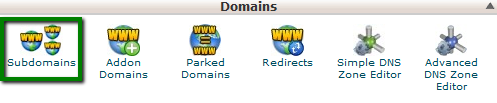
3. Create a subdomain * pointing it to the necessary folder (you will need to specify the path in the field Document Root): 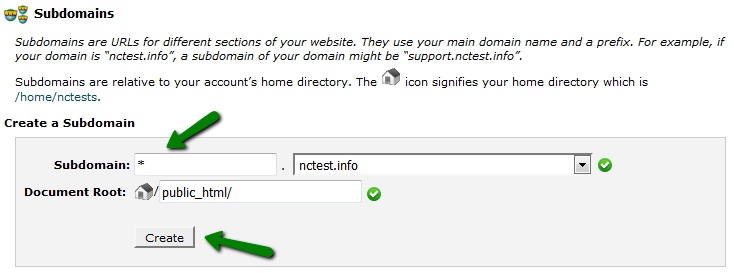
4. Go to the menu Advanced DNS Zone Editor : 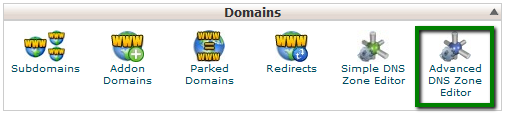
5. Make sure that there is an A record for *.yourdomain.com created and pointed to the server IP address (it could coincide with the IP address of your main domain or ftp.yourdomain.com is pointed to): 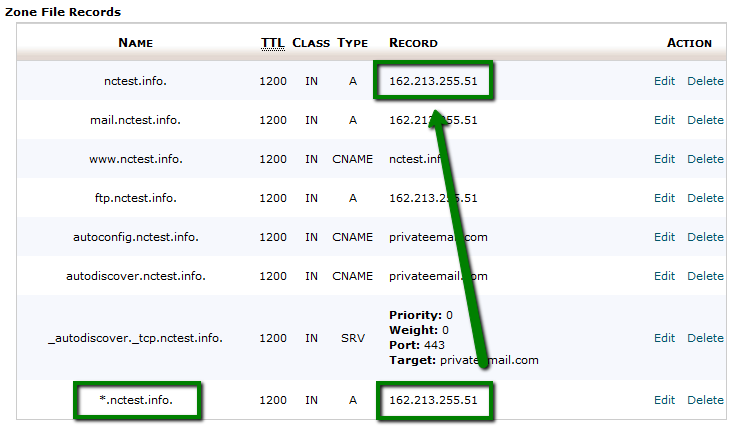
6. Now, you will need to wait until the propagation is over (it should take N seconds, where N – is TTL for this A record; you can edit it manually and reduce the number to speed up the process), and then the wildcard subdomain will work correctly.
That's it!
Was this answer helpful?
Also Read
-
Install wordpress in cPanel Open or Close
1. Login into your cPanel.2. Move down until you find "Softaculous Apps Installer" Section, then... Read More
-
Getting Started with Linux reseller hosting Open or Close
1. Purchasea Linux Reseller Hosting. 2. Login to WHM. You can login to WHM via following URLs.... Read More
-
How to create a site/domain redirect in cPanel Open or Close
You can create the redirect for your domain in your cPanel. In order to do it, perform the... Read More
-
Create Email Account in cPanel Open or Close
To create an email account: To create an email account, follow the steps given below:1.... Read More
-
Modifying Resources of cPanel Account in WHM Open or Close
1. Login to WHM. 2. Click on List Accounts in Account Information Tab. 3. Now select... Read More



