A record
AAAA record
CNAME record
SRV record
TXT record
In order to edit the DNS zone of the domain in your cPanel account, do the following:
1.Log into your cPanel.
2.Navigate to the Domains section and click on the Advanced DNS Zone Editor option: 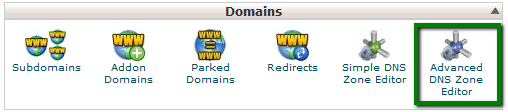
3.Choose the domain you would like to edit from the drop-down menu: 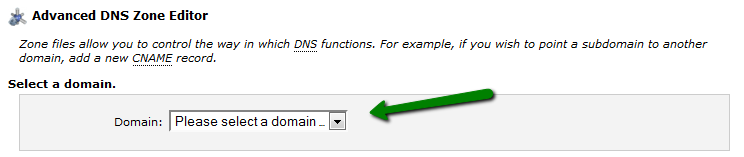
4.If you would like to add a new record, navigate to Add a Record:
A record
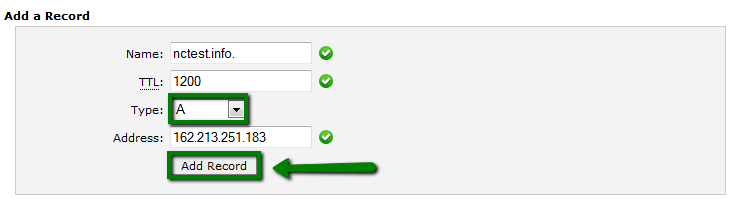
Choose A in the drop-down menu next to the Type field.
An A record (Address Record) points a domain or subdomain to an IP address.
- Name must be a domain with an optional period at the end.
- TTL must be a positive integer (in seconds).
- Address must be an IP address.
Once all the fields are filled in, click on the Add Record button:
AAAA record
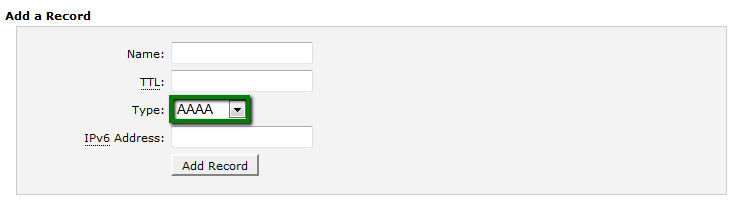
Choose AAAA in the drop-down menu next to the Type field.
AAAA record, also known as "IPv6 address record", maps a hostname to a 128-bit IPv6 address in the Domain Name System (DNS).
Such an option exists in our Advanced DNS zone editor menu, but full IPv6 support has not been implemented yet:
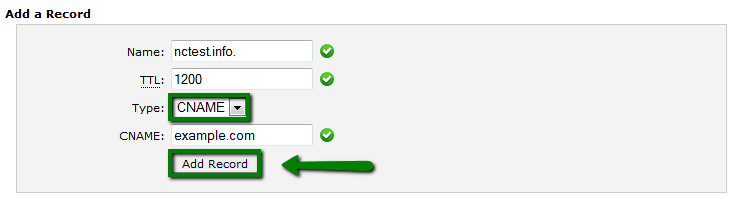
CNAME record
Choose CNAME in the drop-down menu next to the Type field.
CNAME (Canonical Name) points one domain or subdomain to another domain name, allowing you to update one A Record each time you make a change, regardless of how many Host Records need to resolve to that IP address.
- Name must be a domain with an optional period at the end.
- TTL must be a positive integer (in seconds).
- CNAME must be a valid zone name.
Once all the fields are filled in, click on the Add Record button:
SRV record
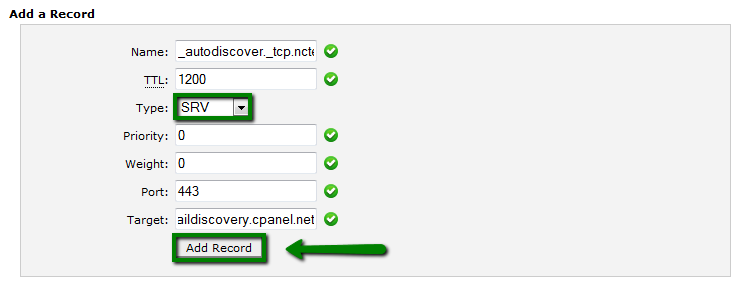
Choose SRV in the drop-down menu next to the Type field.
An SRV record points one domain to another domain name using a specific destination port.
- Name includes the service (the symbolic name of the desired service) and protocol (the Protocol used by the service, usually either TCP or UDP).
- TTL must be a positive integer (in seconds).
- Priority - priority of the target host, lower value means more preferred.
- Weight - relative weight for records with the same priority, a higher value means a more preferred one.
- Port - TCP or UDP port on which the service is to be found.
- Target - canonical hostname of the machine providing the service, ending in a dot.
Example:
Name:_autodiscover._tcp.yourdomain.com SRV TTL: 1200 Priority: 0 Weight: 0 Port: 443 Target: privateemail.com
TXT record
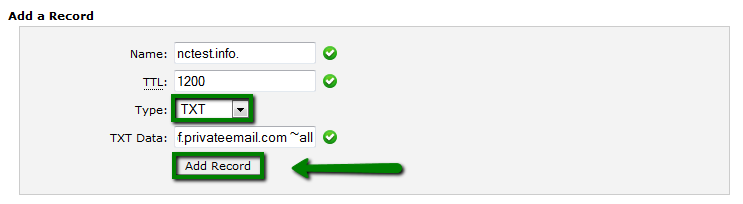
Choose TXT in the drop-down menu next to the Type field.
These records hold a free text form of any type. A fully qualified domain may have many TXT records. The most common uses for TXT records are Sender Policy Framework (SPF), DomainKeys (DK), DomainKeys IdentifiedE-mail (DKIM). TXT records historically have also been used to contain human readable information about a server, network, data center and other accounting information.
- Name must be a domain with an optional period at the end.
- TTL must be a positive integer (in seconds).
- TXT Data cannot be empty or more than 255 characters.
Example: example.com TXT “v=spf1 +a +mx +ip4:198.187.31.8 ?all”
Once all the fields are filled in, click on the Add Record button:
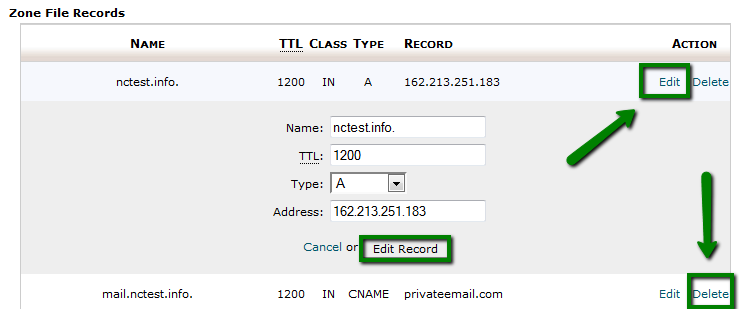
In order to edit an existing record, choose the record that you want to edit from the list of existing DNS records.
Click on Edit, then enter values that you need and click on Edit Record to save changes:
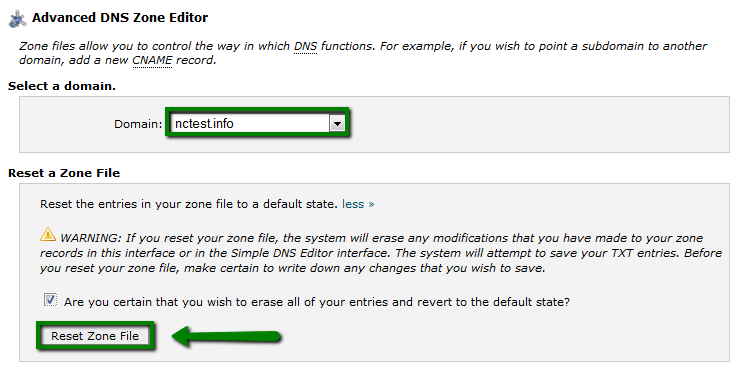
Also, it is possible to reset the DNS zone for your domain to a default one. In this case, the system will erase any modifications you have made to your zone records in this interface or in the Simple DNS zone editor interface. Before you reset your zone file, make sure that you write down any changes that you wish to save.
In order to reset a zone file, select a domain in the drop-down menu, check the corresponding box to confirm you wish to reset the DNS zone for this domain and click Reset Zone File.
That's it!
Was this answer helpful?
Also Read
-
Destroy Unwanted ftp connections in cPanel Open or Close
How to close idle FTP Connections in cPanel Idle FTP connections are caused when an FTP client... Read More
-
Advanced DNS Zone Editor Open or Close
Overview DNS (Domain Name Service) is the component of the Internet that converts human-readable... Read More
-
How to manage databases with phpMyAdmin Open or Close
PhpMyAdmin is an application for MySQL databases management - with it you can create, alter,... Read More
-
Can I add addon domains without changing DNS? Open or Close
By default, you cannot add an addon or a parked domain on our shared servers without changing the... Read More
-
How can I check my website access logs? Open or Close
Using the Raw Access Logs menu in cPanel, you can check the traffic coming to your website before... Read More



